BigFish

曾经靠饿,瘦了20斤

0%

如何在react项目接入react-i18next

如何在react项目接入react-i18next

一、创建项目

1
pnpm create vite@latest my-i18n-demo -- --template react-ts

选项如下:

1
2
3
4
5
6
7
8
9
10
11
◇  Select a framework:
│ React

◇ Select a variant:
│ TypeScript + React Compiler

◇ Use rolldown-vite (Experimental)?:
│ No

◇ Install with pnpm and start now?
│ Yes

暂时不要用rolldown-vite,实测适配有问题,未来在看。

版本依赖:

1
2
3
4
5
6
7
8
9
10
11
12
13
14
15
16
17
18
19
20
21
22
23
24
25
26
27
28
29
30
31
32
33
{
"name": "my-i18n-demo",
"private": true,
"version": "0.0.0",
"type": "module",
"scripts": {
"dev": "vite",
"build": "tsc -b && vite build",
"lint": "eslint .",
"preview": "vite preview"
},
"dependencies": {
"i18next": "^25.8.0",
"react": "^19.2.0",
"react-dom": "^19.2.0",
"react-i18next": "^16.5.4"
},
"devDependencies": {
"@eslint/js": "^9.39.1",
"@types/node": "^24.10.1",
"@types/react": "^19.2.5",
"@types/react-dom": "^19.2.3",
"@vitejs/plugin-react": "^5.1.1",
"babel-plugin-react-compiler": "^1.0.0",
"eslint": "^9.39.1",
"eslint-plugin-react-hooks": "^7.0.1",
"eslint-plugin-react-refresh": "^0.4.24",
"globals": "^16.5.0",
"typescript": "~5.9.3",
"typescript-eslint": "^8.46.4",
"vite": "^7.2.4"
}
}

二、代码结构

1
2
3
4
5
6
├── src
│   ├── App.css
│   ├── App.tsx
│   ├── i18n.ts
│   ├── index.css
│   └── main.tsx

main.tsx如下:

1
2
3
4
5
6
7
8
9
10
11
import { StrictMode } from 'react'
import { createRoot } from 'react-dom/client'
import './index.css'
import App from './App.tsx'
import "./i18n";

createRoot(document.getElementById('root')!).render(
<StrictMode>
<App />
</StrictMode>,
)

i18n.ts如下:

1
2
3
4
5
6
7
8
9
10
11
12
13
14
15
16
17
18
19
20
21
22
23
24
25
26
27
28
import i18n from "i18next";
import { initReactI18next } from "react-i18next";

i18n.use(initReactI18next).init({
resources: {
en: {
translation: {
title: "react-i18next Demo",
description: "This is an English description.",
changeLang: "Change language",
},
},
zh: {
translation: {
title: "react-i18next 示例",
description: "这是中文描述。",
changeLang: "切换语言",
},
},
},
lng: "zh",
fallbackLng: "en",
interpolation: {
escapeValue: false,
},
});

export default i18n;

App.tsx如下:

1
2
3
4
5
6
7
8
9
10
11
12
13
14
15
16
17
18
19
20
21
import React from "react";
import { useTranslation } from "react-i18next";

const App: React.FC = () => {
const { t, i18n } = useTranslation();

const toggleLanguage = () => {
i18n.changeLanguage(i18n.language === "zh" ? "en" : "zh");
};

return (
<div style={{ padding: 24 }}>
<h1>{t("title")}</h1>
<p>{t("description")}</p>
<button onClick={toggleLanguage}>{t("changeLang")}</button>
<p style={{ marginTop: 12 }}>Current: {i18n.language}</p>
</div>
);
};

export default App;

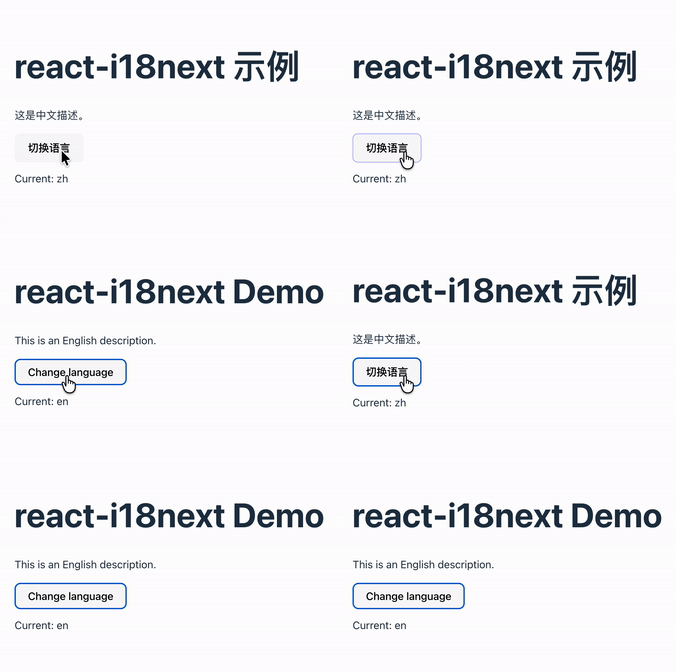
三、效果如下

Kapture

Welcome to my other publishing channels